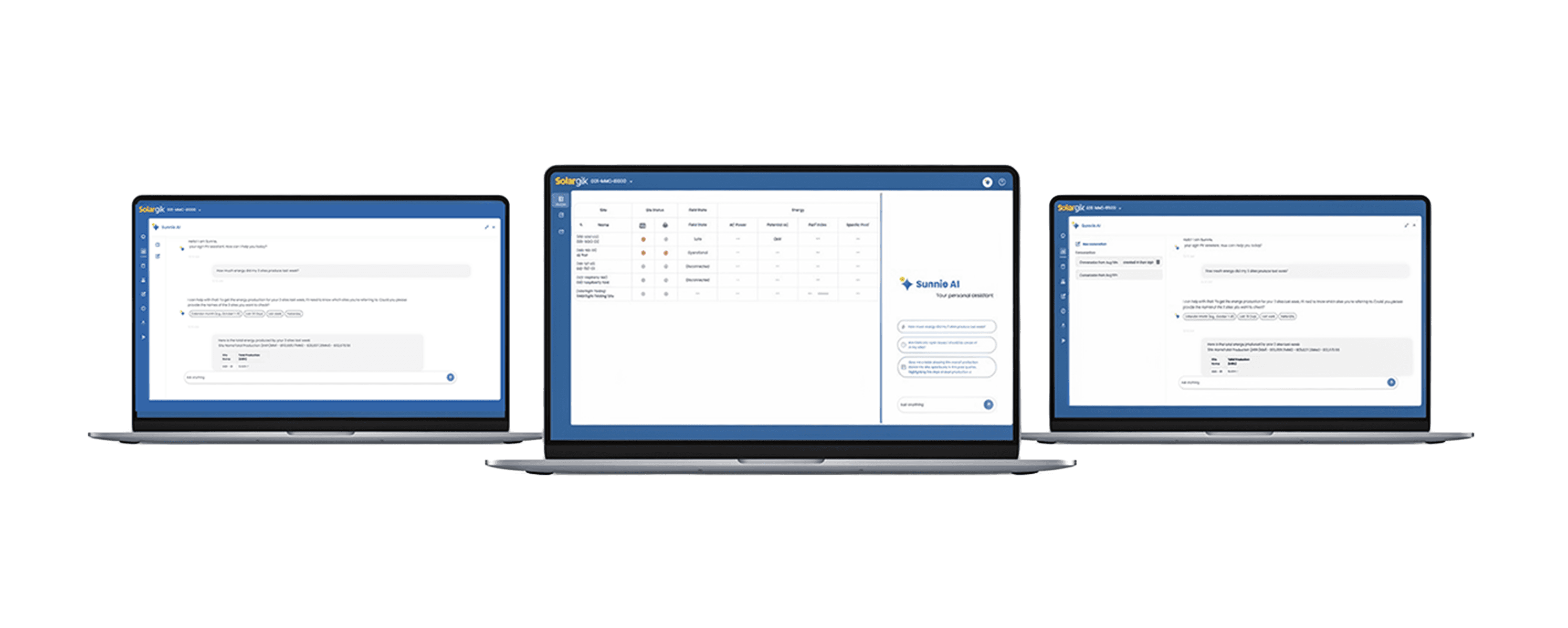
Context
The company operated a complex, data-heavy enterprise platform where valuable information was often difficult to access quickly. Leadership wanted to introduce AI into the product, but the initial concept lacked clear user value. We reframed the opportunity: instead of adding a chatbot, create an embedded AI Copilot that helps users analyze data, generate insights, and work faster inside existing workflows.
My Role:
Product Designer → Design Lead
Led design product direction, UX strategy, interaction design, and rapid iterations with development
from concept to launch.
+ AI Product
+ B2B SaaS
+ Analytics
+ Shipped Fast
+ Enterprise UX
Challenge: Leadership requested AI before user problems were clearly defined.
001-MMC-B1000
Perf index
82
%
AC
70.4
kW
Wind
4.8
m/s
operational
safe mode
Wed 1 Jan 10:09:08
s
Sprinklers
User record
Trends
Issues
!
Weather
Trackers
Dashboard
Agri
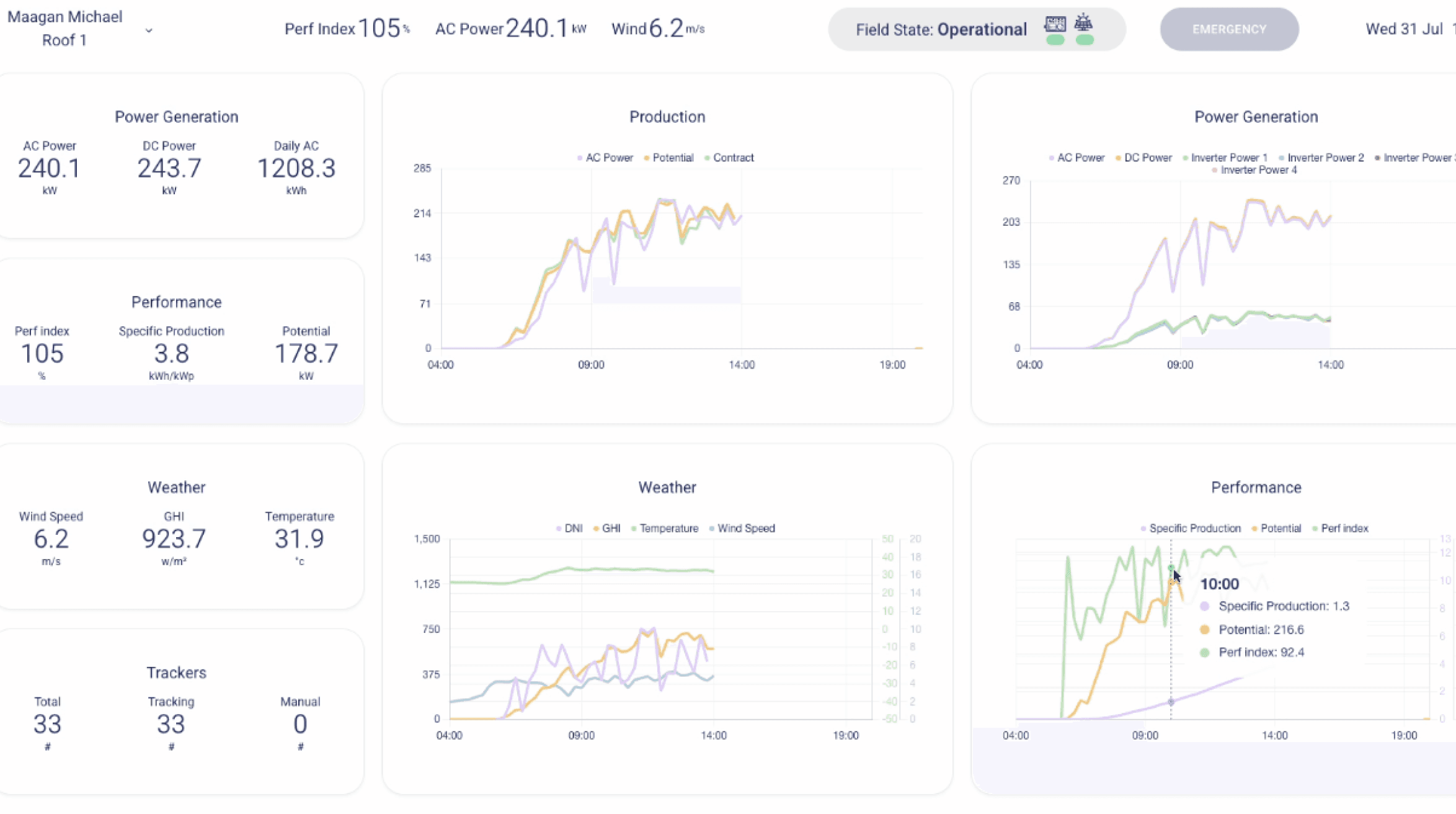
- Cluttered legacy dashboards -
The request was simple: “We need AI in the platform”
But users were not asking for chat.
They were struggling with:
Buried information
Fragmented navigation
Slow reporting workflows
Hard to find insights
Too many steps to answer simple questions
The real need was clarity, speed, and decision support.
Less digging through screens
No
More getting what you asked for
Yes!
Product Reframe: From chatbot feature
to embedded Copilot
Instead of a floating chatbot, I redesigned the concept into a contextual Copilot integrated
into the platform.
This made AI feel useful, trustworthy, and part of real work.
Users could continue using the system while asking the Copilot for help.
Benefits:
AI beside the workflow
No disruption to existing habits
Immediate value
Familiar enterprise interaction model
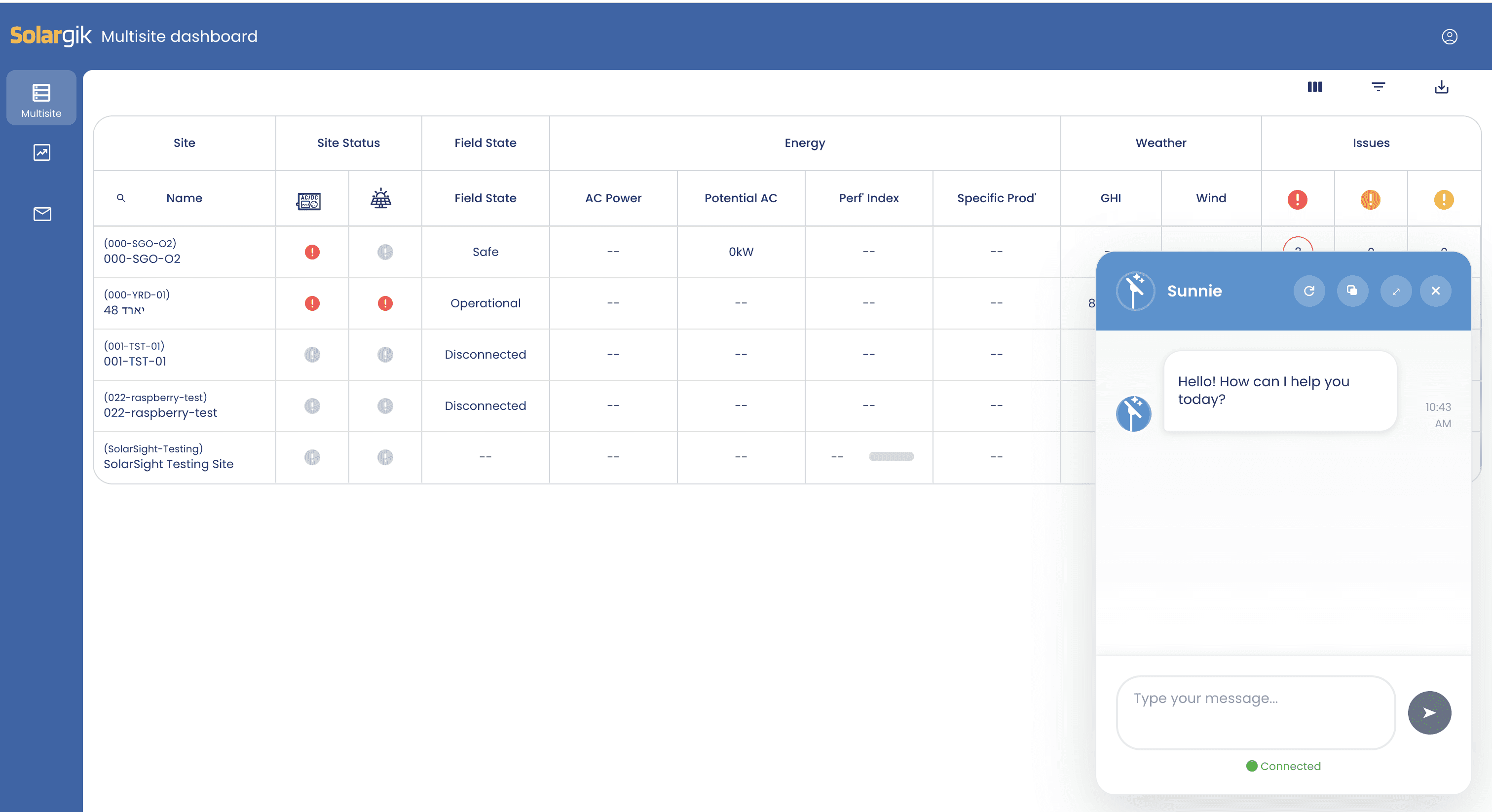
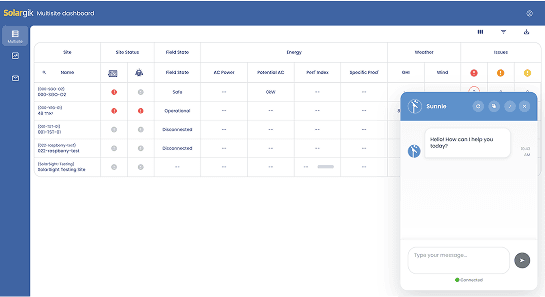
- V1: Generic chatbot popup -
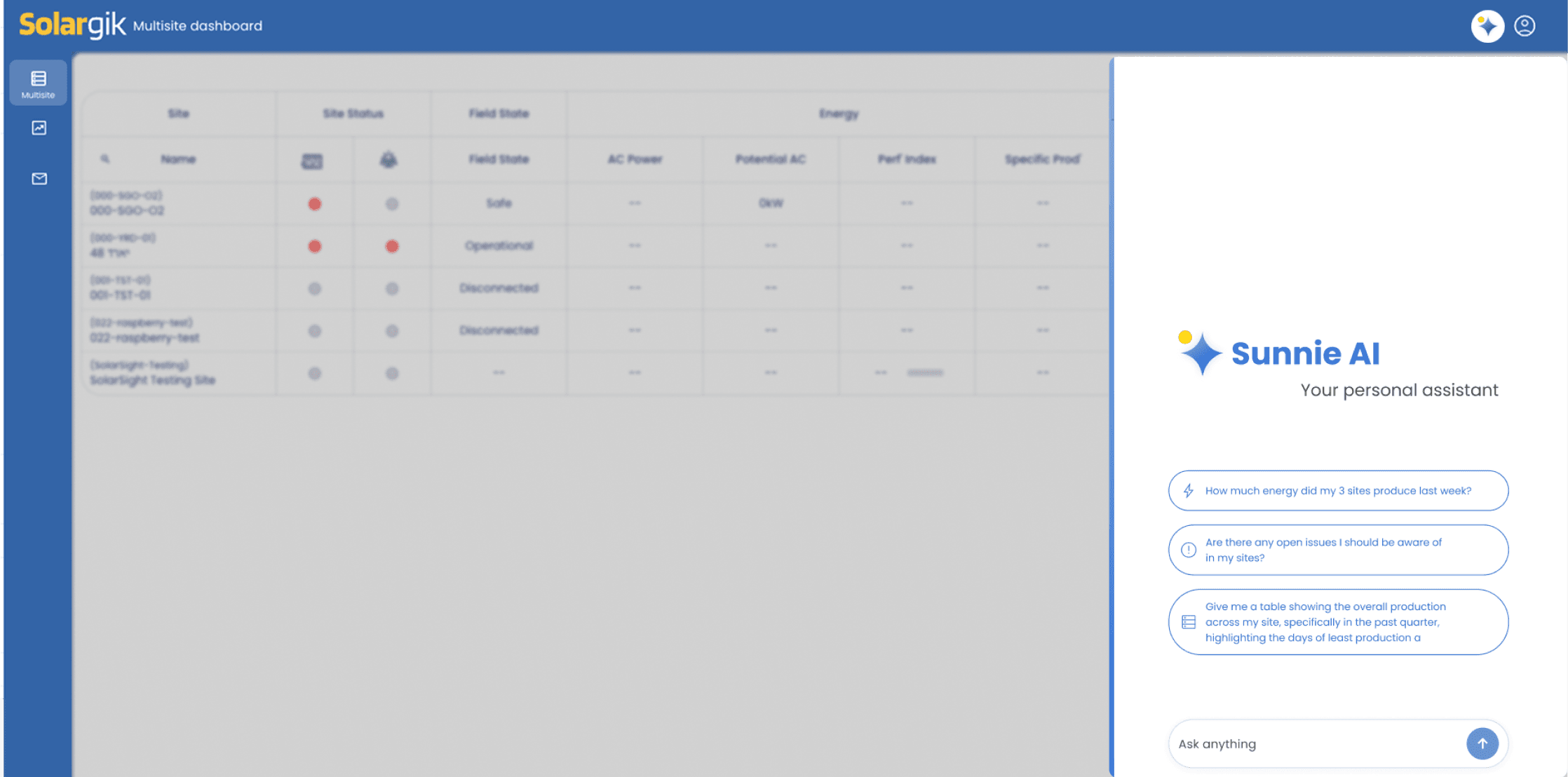
- In production: Modern docked Copilot panel -
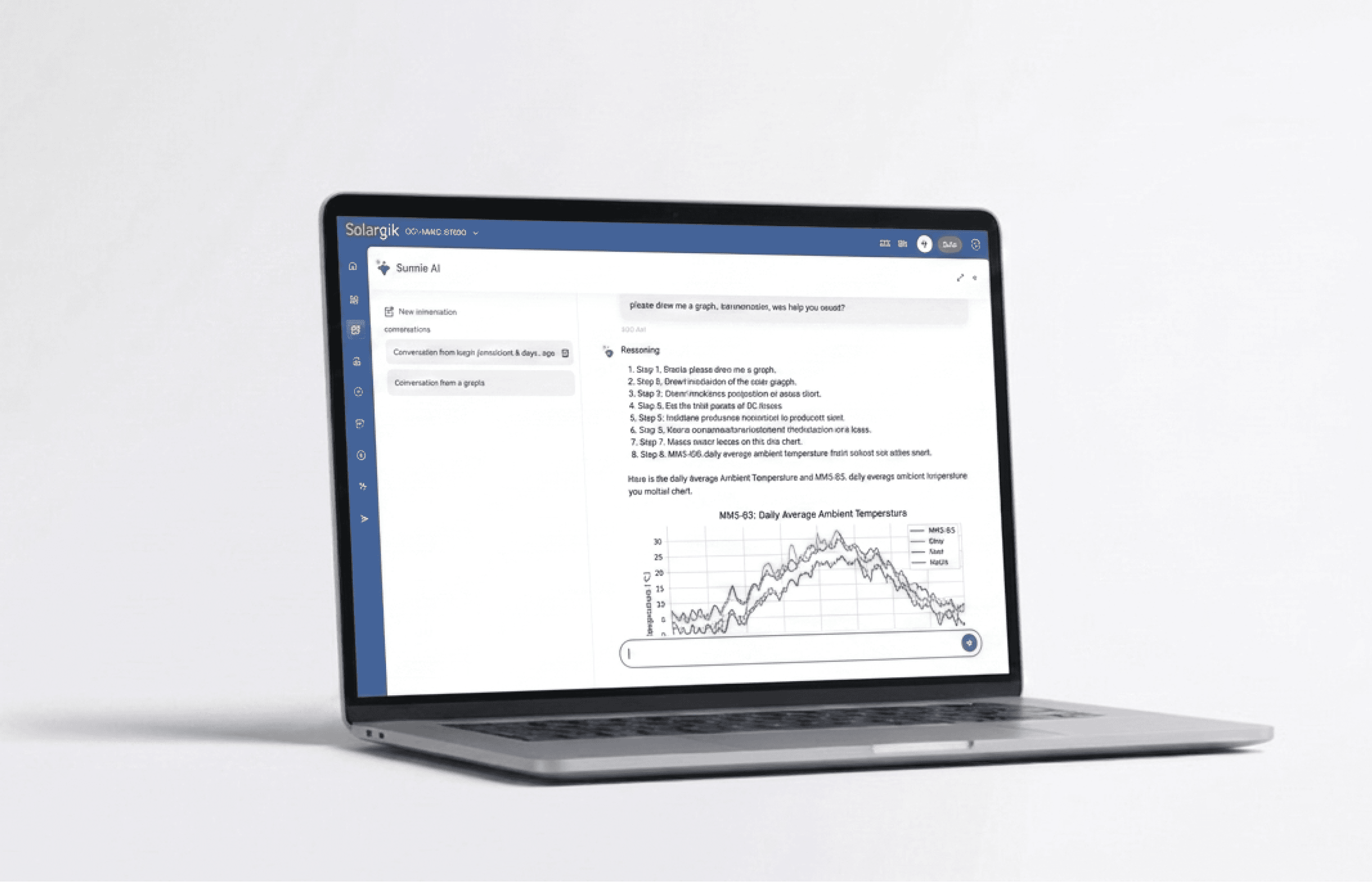
What users could do: Natural-language analytics
for complex operations
The Copilot enabled users to ask questions in plain language and receive answers
as text, tables, charts, or insights.
Example prompts:
1. Compare production between Site A and Site B
2. Why is Site A underperforming?
3. Show all issues from last month by severity
4. Build a chart of downtime trends
5. Summarize anomalies from this week
6. Which assets need immediate attention?
Transformed a legacy enterprise platform
into a conversational analytics experience.
AI Copilot for Operational Intelligence
+ Shipped Fast
+ Analytics
+ AI Product
+ B2B SaaS
+ Enterprise UX
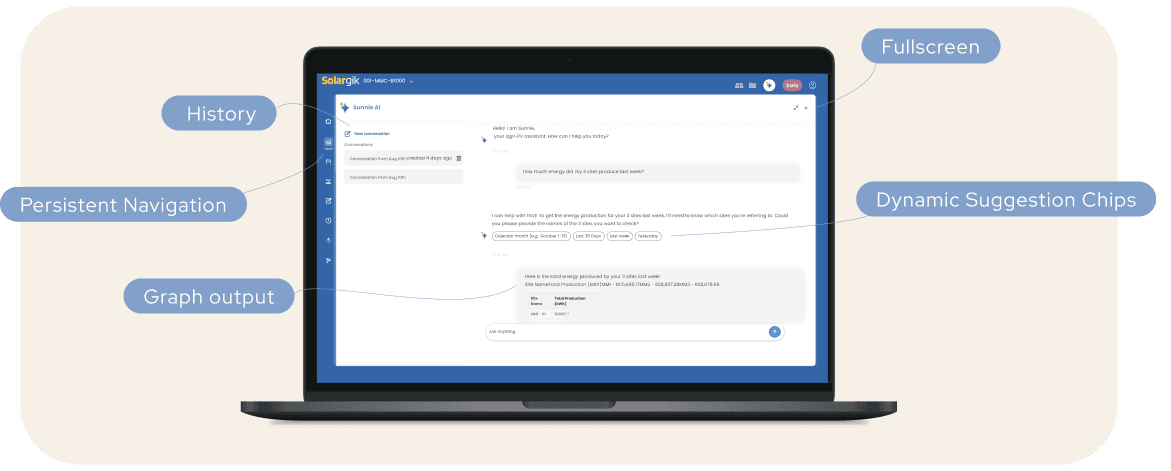
Key UX Decisions: Designing for real work, not demos
Docked Side Panel
Use AI while staying inside the platform.
Full Screen Mode
Expand for deeper analysis.
Conversation History
Return to previous findings.
Structured Outputs
Tables and charts, not only chat text.
Persistent Context
Keep answers connected to product data.
This project fundamentally changed our delivery model.
With development accelerated by AI-assisted coding, the traditional "design-first"
linear handoff became a bottleneck.
We shifted to a highly collaborative, non-linear workflow where design and development happened in parallel:
Co-creation over Handoffs: I worked side by side with engineers, making real-time design decisions directly within the development environment.
Iterative Refinement: In some cases, functional prototypes were built first to test AI feasibility, followed by design "cleanup" and UX optimization once the logic was proven.
Strategic Guidance: My role shifted from just "producing screens" to continuously guiding product decisions and ensuring UX integrity at every fast paced sprint.
Accelerating Time-to-Market: By replacing linear handoffs with a continuous co-creation loop, we significantly reduced development cycles and ensured UX integrity
from the first build.
Design (Product)
Test & refine
Build (Engineering)
AI beside the workflow
Immediate value
No disruption to existing habits
Familiar enterprise
interaction model
- V1: Generic chatbot popup -
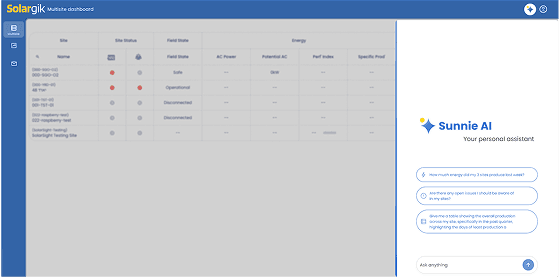
- In production:
Modern docked Copilot panel -
The Copilot enabled users to ask questions in plain language and receive answers
as text, tables, charts, or insights.
Example prompts:
1. Compare production between Site A and Site B
2. Why is Site A underperforming?
3. Show all issues from last month by severity
4. Build a chart of downtime trends
5. Summarize anomalies from this week
6. Which assets need immediate attention?
What users could do: Natural-language analytics
for complex operations
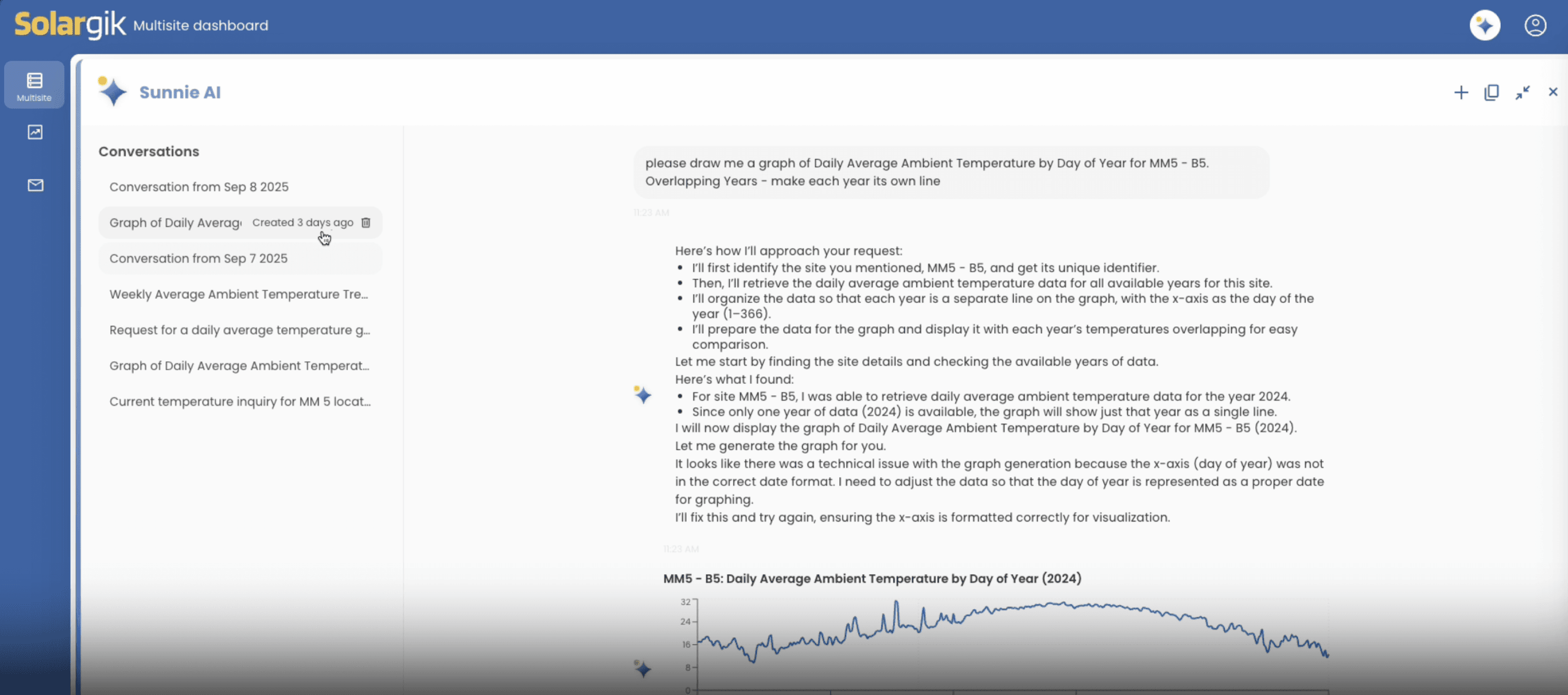
- Natural language prompts
turned complex data requests
into instant charts and insights -
Docked Side Panel
Use AI while staying inside the platform.
Full Screen Mode
Expand for deeper analysis.
Conversation History
Return to previous findings.
Structured Outputs
Tables and charts, not only chat text.
Persistent Context
Keep answers connected to product data.
This project fundamentally changed our delivery model.
With development accelerated by AI-assisted coding, the traditional "design-first"
linear handoff
became a bottleneck.
We shifted to a highly collaborative, non-linear workflow where design and development happened in parallel:
Co-creation over Handoffs: I worked side by side with engineers, making real-time design decisions directly within the development environment.
Iterative Refinement: In some cases, functional prototypes were built first to test AI feasibility, followed by design "cleanup" and UX optimization once the logic was proven.
Strategic Guidance: My role shifted from just "producing screens" to continuously guiding product decisions and ensuring UX integrity at every fast paced sprint.
Accelerating Time-to-Market: By replacing linear handoffs with a continuous co-creation loop, we significantly reduced development cycles and ensured UX integrity
from the first build.
A new design process:
Designing at AI speed
This project fundamentally changed our delivery model.
With development accelerated by AI-assisted coding, the traditional "design-first"
linear handoff
became a bottleneck.
We shifted to a highly collaborative, non-linear workflow where design and development happened in parallel:
Co-creation over Handoffs: I worked side by side with engineers, making real-time design decisions directly within the development environment.
Iterative Refinement: In some cases, functional prototypes were built first to test AI feasibility, followed by design "cleanup" and UX optimization once the logic was proven.
Strategic Guidance: My role shifted from just "producing screens" to continuously guiding product decisions and ensuring UX integrity at every fast paced sprint.
Accelerating Time-to-Market: By replacing linear handoffs with a continuous co-creation loop, we significantly reduced development cycles and ensured UX integrity
from the first build.
A new design process:
Designing at AI speed
This project fundamentally changed our delivery model.
With development accelerated by AI-assisted coding, the traditional "design-first"
linear handoff
became a bottleneck.
We shifted to a highly collaborative, non-linear workflow where design and development happened in parallel:
Co-creation over Handoffs: I worked side by side with engineers, making real-time design decisions directly within the development environment.
Iterative Refinement: In some cases, functional prototypes were built first to test AI feasibility, followed by design "cleanup" and UX optimization once the logic was proven.
Strategic Guidance: My role shifted from just "producing screens" to continuously guiding product decisions and ensuring UX integrity at every fast paced sprint.
Accelerating Time-to-Market: By replacing linear handoffs with a continuous co-creation loop, we significantly reduced development cycles and ensured UX integrity
from the first build.
A new design process:
Designing at AI speed
This project fundamentally changed our delivery model.
With development accelerated by AI-assisted coding, the traditional "design-first"
linear handoff
became a bottleneck.
We shifted to a highly collaborative, non-linear workflow where design and development happened in parallel:
Co-creation over Handoffs: I worked side by side with engineers, making real-time design decisions directly within the development environment.
Iterative Refinement: In some cases, functional prototypes were built first to test AI feasibility, followed by design "cleanup" and UX optimization once the logic was proven.
Strategic Guidance: My role shifted from just "producing screens" to continuously guiding product decisions and ensuring UX integrity at every fast paced sprint.
Accelerating Time-to-Market: By replacing linear handoffs with a continuous co-creation loop, we significantly reduced development cycles and ensured UX integrity
from the first build.
A new design process:
Designing at AI speed
A new design process: Designing at AI speed
Outcome: Impact & Launch
Launched quickly to production, transforming how users interact with complex data.
For Users:
Significant reduction in
"data-mining" time.
Complex queries were reduced from multiple steps to a single natural language prompt
Reducing friction and cognitive load.
For the Business:
Created a strong innovation signal.
The Copilot became a key highlight in demos and conferences
Driving excitement and proving the platform's future-readiness.
For Users:
Significant reduction
in "data-mining" time.
Complex queries were reduced from multiple steps to a single natural language prompt
Reducing friction and cognitive load.
What I learned: Key Takeaways
Product Framing over Hype: Users don’t need "AI"
they need clarity and speed. Framing it as a Copilot made it a functional tool rather than a novelty.
UX is the Bridge: Great AI UX supports real behavior before replacing it.
Design as Strategy: As execution gets faster through AI-assisted development, the designer’s role shifts from producing screens to guiding product logic and strategic decisions.
- View more of my work -
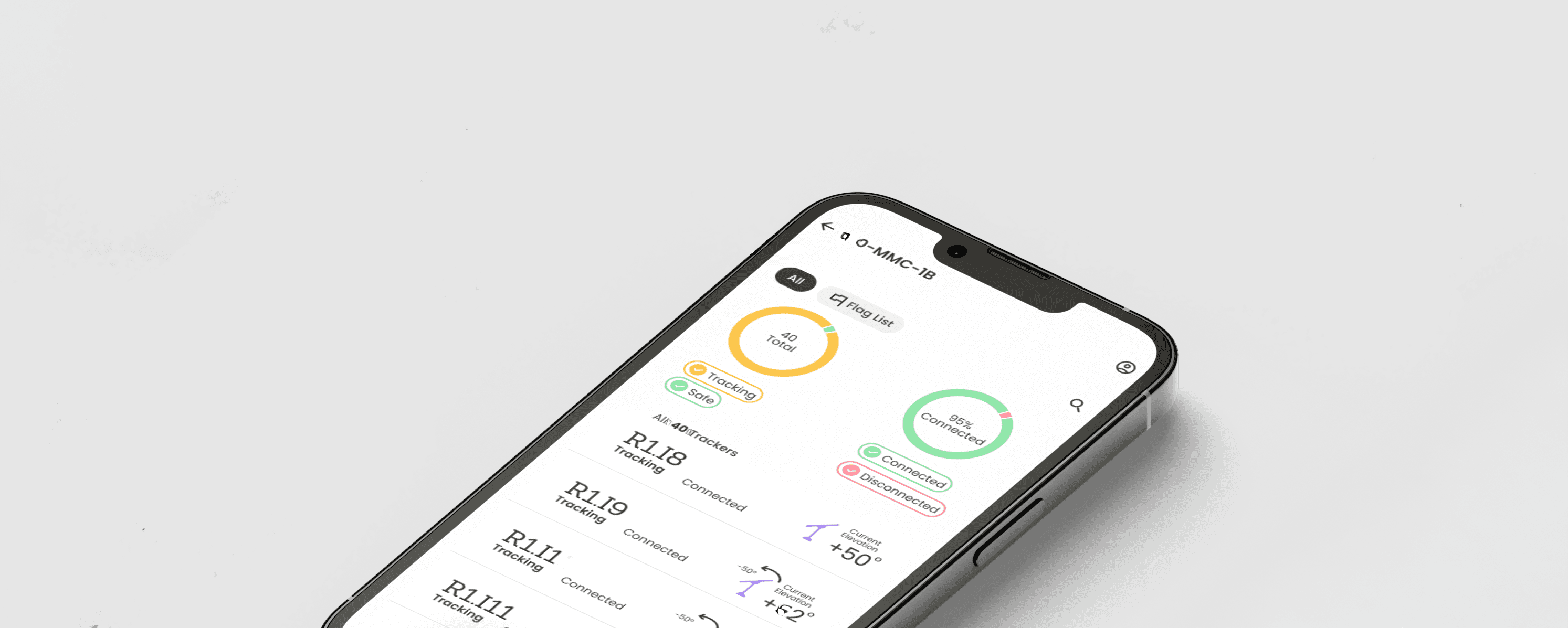
Real- Time, solar panel tracker Control App
Transitioning the Control Application to Mobile
for Field team
Mobile Control App

This project fundamentally changed our delivery model.
With development accelerated by AI-assisted coding, the traditional
"design-first" linear handoff
became a bottleneck.
We shifted to a highly collaborative, non-linear workflow where design and development happened in parallel:
Co-creation over Handoffs: I worked side by side with engineers, making real-time design decisions directly within the development environment.
Iterative Refinement: In some cases, functional prototypes were built first to test AI feasibility, followed by design "cleanup" and UX optimization once the logic was proven.
Strategic Guidance: My role shifted from just "producing screens" to continuously guiding product decisions and ensuring UX integrity at every fast paced sprint.
Accelerating Time-to-Market: By replacing linear handoffs with a continuous co-creation loop, we significantly reduced development cycles and ensured UX integrity
from the first build.
A new design process:
Designing at AI speed
Key UX Decisions: Designing for real work, not demos
Context
The company operated a complex, data-heavy enterprise platform where valuable information was often difficult to access quickly. Leadership wanted to introduce AI into the product, but the initial concept lacked clear user value. We reframed the opportunity: instead of adding a chatbot, create an embedded AI Copilot that helps users analyze data, generate insights, and work faster inside existing workflows.
My Role:
Product Designer → Design Lead
Led design product direction, UX strategy, interaction design, and rapid iterations with development
from concept to launch.
- Natural language prompts turned complex data requests
into instant charts and insights -
Outcome: Impact & Launch
Launched quickly to production, transforming how users interact with complex data.
What I learned: Key Takeaways
Product Framing over Hype: Users don’t need "AI"
they need clarity and speed. Framing it as a Copilot made it a functional tool rather than a novelty.
UX is the Bridge: Great AI UX supports real behavior before replacing it.
Design as Strategy: As execution gets faster through AI-assisted development, the designer’s role shifts from producing screens to guiding product logic and strategic decisions.
- View more of my work -
Real- Time, solar panel tracker Control App
Transitioning the Control Application to Mobile
for Field team
Mobile Control App
My Role:
The company operated a complex, data-heavy enterprise platform where valuable information was often difficult to access quickly. Leadership wanted to introduce AI into the product, but the initial concept lacked clear user value. We reframed the opportunity: instead of adding a chatbot, create an embedded AI Copilot that helps users analyze data, generate insights, and work faster inside existing workflows.
Product Designer → Design Lead
Led design product direction, UX strategy, interaction design, and rapid iterations with development
from concept to launch.
Challenge: Leadership requested AI before user problems were clearly defined.
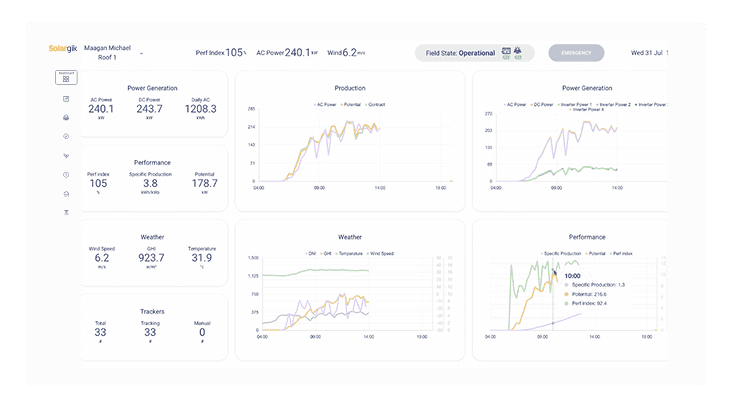
The request was simple: “We need AI in the platform”
But users were not asking for chat.
They were struggling with:
Buried information
Fragmented navigation
Slow reporting workflows
Hard to find insights
Too many steps to answer simple questions
The real need was clarity, speed, and decision support.
- Cluttered legacy dashboards -
Digging through screens
No
Getting exactly what you asked for
Yes!
Product Reframe:
From chatbot feature
to embedded Copilot
Instead of a floating chatbot, I redesigned the concept into a contextual Copilot integrated
into the platform. This made AI feel useful, trustworthy, and part of real work.Users could continue using the system while asking the Copilot for help.
Benefits:
Context
Transformed a legacy enterprise platform
into a conversational analytics experience.
AI Copilot for
Operational Intelligence
For Users:
Significant reduction in
"data-mining" time.
Complex queries were reduced from multiple steps to a single natural language prompt
Reducing friction and cognitive load.
For the Business:
Created a strong innovation signal.
The Copilot became a key highlight in demos and conferences
Driving excitement and proving the platform's future-readiness.
- View more of my work -
Real- Time, solar panel tracker Control App
Transitioning the Control Application to Mobile
for Field team
Mobile Control App