Case Study
Real-Time Solar Tracker Control App
Transitioning a desktop SCADA control room into a mobile-first tool, so field teams can monitor and act on tracker status from anywhere on site.
MobileField OpsReal-Time DataSCADA
Full flow: login → multisite → live dashboard → tracker status → bulk actions
Context
The existing control system was built for the control room: dense desktop dashboards monitoring solar tracker fields, inverters, and environmental sensors across multiple sites. Field technicians needed that same visibility and control while standing next to the hardware, not sitting at a desk.
The goal was to bring the core of that control room — live status, alerts, and the ability to act on individual trackers — into a mobile app built for one-handed, on-site use.
My Role
Led the UX/UI design for the mobile transition — reworking desktop-first information hierarchy into mobile-native patterns, and designing the interaction model for field-level actions like flagging and bulk tracker control.
Site Dashboard: Live Status at a Glance
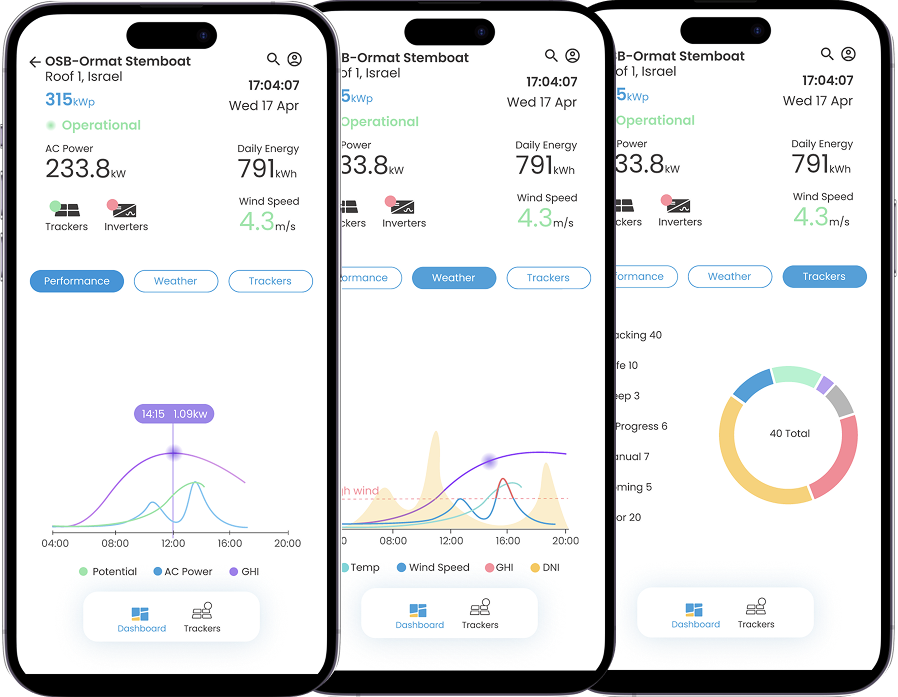
Each site's dashboard surfaces the numbers that matter most first — AC power, daily energy, wind speed, operational state — then lets the user drill into Performance, Weather, or Trackers without leaving the screen. Tapping into the live chart surfaces exact values on demand instead of cluttering the default view.
From Overview to Individual Trackers
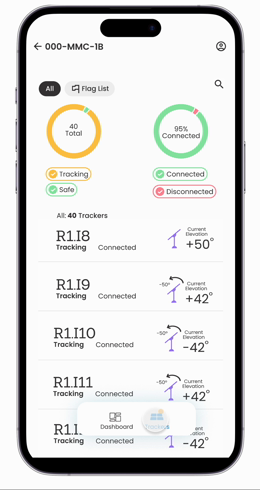
The donut chart answers "how is the site doing." The tracker list answers "which tracker, exactly." Each row shows live tracking state, connection status, and current elevation, with search and a dedicated flag list for anything that needs follow-up.
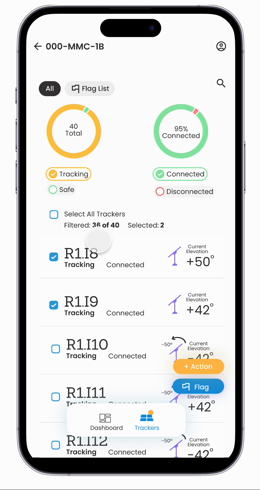
For technicians handling several trackers at once, we added multi-select with bulk actions — flag or act on a group of trackers in one motion instead of repeating the same steps individually.
Tracker listStatus, connection, and elevation per tracker
Bulk actionsSelect multiple trackers, flag or act at once
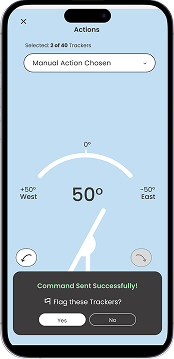
Once a group is selected, the Actions sheet walks through the rest: choose Manual or Release, dial in the exact elevation, and send — with a confirmation before it goes out.
Choose Manual → dial in elevation → send action → confirm
Surfacing Issues Before They Become Downtime
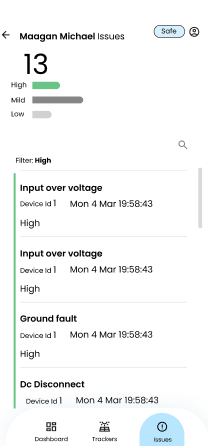
Beyond status and control, the app gives field teams a dedicated view of everything that needs attention across a site — voltage faults, ground faults, disconnects — ranked by severity so the most urgent issues surface first instead of getting buried in a long alert log.
IssuesFilter straight to the faulty trackers and act on them directly
Manual overridePrecise elevation control when automation isn't enough
Key UX Decisions
Tab-Based Dashboard
Performance, Weather, and Trackers live in one screen instead of separate pages.
Donut Before List
Status breakdown first, individual tracker detail second — matches how field teams triage.
Search & Flag List
Fast retrieval across large tracker fields, plus a dedicated queue for follow-up.
Multi-Select Actions
Bulk flag/act on trackers, built for repetitive field workflows.
Severity-Ranked Issues
High/mid/low ranking surfaces what actually needs attention first.
Guided Manual Override
Dropdown plus rotation dial keeps precise overrides simple, even mid-field.
Outcome
The desktop control room's core capabilities — live monitoring, tracker-level detail, and the ability to act — now travel with the field team, condensed into a mobile-native interaction model rather than a shrunk-down desktop view. Actions that previously required calling into support, or were too complex to attempt from the field, became things teams could resolve themselves, directly from their phones.
On-site visibility
Faster tracker triage
Bulk field actions
Multi-site switching
Severity-ranked alerts
Reduced support escalations